FAQ - Requests
Is there a limit of requests I can make?
To prevent abuse and to be fair to everyone, there is a limit of requests you can make each 7 days. You can check the plan page to see the limit.
You can check the amount of requests you have left by going on your profile on the request website. The limit is rolling, meaning it resets 7 days after each individual request.
Example: If you make a request on Monday, that request slot will free up the following Monday.
How do I make a request for content?
We maintain an up-to-date library of the latest and most popular content. However, for anything else, our members can access a request system. All requests, except for anime, are handled through Seerr.
Why was my request denied?
If your request was denied, it typically means we have no way of obtaining the media or we are running low on storage space. However, we keep your request on the backend and will periodically check if we can acquire the media at a later time.
My request was marked as available, but it isn't on the server. Why is that?
If your request was marked as available but is not yet on the server, it is currently being processed and will appear shortly.
Can I request adult content?
We do not currently allow requests for any adult content.
What should I do if my request isn't fulfilled?
If several days have passed since your request was submitted and you have not received any updates, please message me on Discord or via email to let me know.
What should I do if my request is fulfilled incorrectly?
If your request is fulfilled incorrectly, please message me on Discord or via email to let me know so we can promptly address the issue.
Do requests expire?
Requests do not expire, and the system continues to check all requests automatically on a daily basis. If one of our sources uploads something that you requested months ago, the system will download it on its next daily check and will alert you. Requests never expire, and the system will always try to fulfill all of them every day. This means you can request media that is not out yet, and once it's released and added to our servers, you'll receive an email informing you that your previous request is now available to watch.
How to request?
1. [Preferred Method]
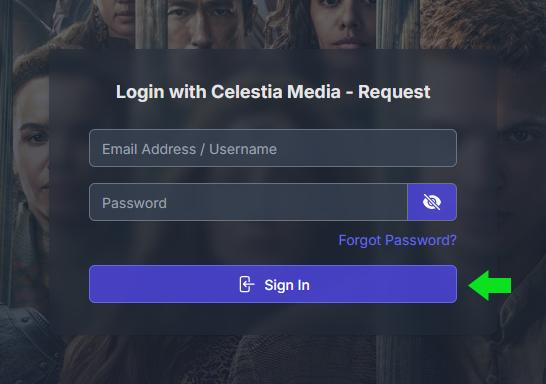
You can login in through Seerr to request content.
- Email Address: Your email that you are using to access a media server
- Password: You should have received an email with the subject line "(Request - Celestia Media)" containing the password.
2. [Manual Method]
If the request system is down or can't be found on Seerr
- Please use #manual-request forum on Discord server.
I forgot my Seerr password or need to change it?
1. Forgot Password Method
- Click on "Forgot Password?"
- Type in your email address
- Click "Email Recovery Link"
- Check your email and click on "Reset Password", it will open a new tab on your web browser
- Type in new password
- Click on "Save Changes", you should be able to login with your email and new password.
2. Change Password Method
- If you are logged in, click on your profile picture near the top right.
- Click on "Settings".
- Navigate to the "Password" tab.
- Enter your current password and then your new password.
- Click on "Save Changes".